Last year, I reviewed a website for a client who could not understand why their traffic was decent, but sales were nearly zero. Good rankings, reasonable visitors, terrible results. When we pulled up the analytics, the bounce rate was sitting at 78% on the product pages.
People were landing. People were leaving. Nobody was buying.
That single number told a bigger story than any ranking report could. And once we fixed the root causes, slow load speed, confusing layout, and no clear next step, things started moving in the right direction within weeks.
If your Bounce rate matters for SEO, is high, and you are not sure why, or if you are not even sure what bounce rate really means for your SEO, this guide covers everything you need to know.
What Is Bounce Rate?
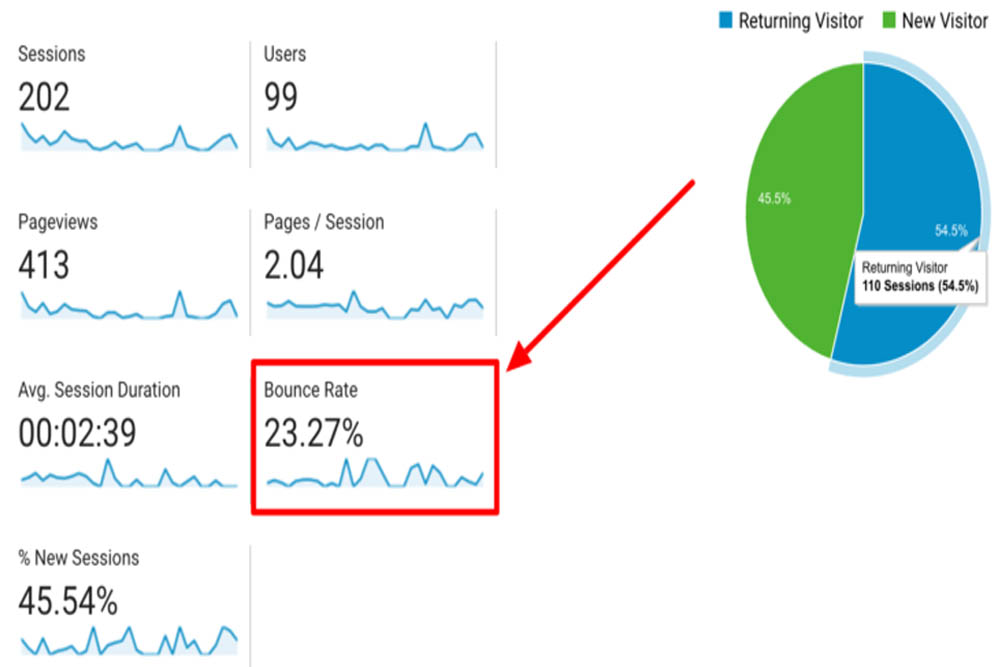
Bounce rate is the percentage of visitors who land on a page and leave without taking any further action. No second page visit. No form fill. No click on a link. Just arrive and leave.
In older versions of Google Analytics, a bounce meant a single-page session regardless of time spent. In Google Analytics 4, which is now the industry standard in 2026, the definition is more nuanced. GA4 calculates bounce rate as the inverse of engagement rate.
A session counts as engaged if the visitor spends more than 10 seconds on the page, views at least two pages, or triggers a conversion event. Any session that does not meet any of these three conditions counts as a bounce.
So a visitor who reads your full 2,000-word article for 9 minutes and then closes the tab — that can still register as a bounce in certain setups. The metric has limitations, and understanding those limitations is important before reacting to any number.
How Is Bounce Rate Measured in GA4 in 2026?
The formula is simple. Take the number of unengaged sessions, divide by total sessions, and multiply by 100. That percentage is your bounce rate.
What changed in GA4 is that Google now cares more about whether the visit was meaningful, not just whether the visitor clicked to a second page. The shift toward engagement rate reflects a broader change in how search engines evaluate user experience, which brings us to why bounce rate matters for SEO.
What Is a Good Bounce Rate for Your Website?
The honest answer is — it depends. An Adilo study that analyzed 2,001 websites and over 16,000 data points found the average website bounce rate sits at 44.43%. But averages alone do not tell the full story.
Here is how bounce rates break down by website type:
Ecommerce product pages sit around 20 to 45%. B2B service websites land between 25 and 50%. Lead generation pages typically range from 30 to 55%. Blogs and publishers often show 60 to 80%, and that is completely normal. Paid campaign landing pages run 40 to 65%.
A 70% bounce rate on a blog post where someone found exactly what they searched for is a success. The same 70% on an ecommerce product page is a serious problem.
Is a Low Bounce Rate Always Good?
Not always. A 0% bounce rate almost certainly means your analytics tracking code is broken — possibly fired twice on the same page, or a plugin conflict preventing proper data from reaching Google Analytics. A healthy minimum, regardless of your website type, is around 20%.
It is also worth knowing that 100% bounce rate usually means either bot traffic or a single-page website where the URL never changes as visitors scroll. Neither is useful data.
Context matters more than the number itself.
Does Bounce Rate Affect SEO Rankings?
Here is where things get interesting — and where a lot of marketers get confused.
Google has never officially confirmed that raw bounce rate data from Google Analytics feeds directly into its ranking algorithm. In fact, research from Orbit Media showed that their top-ranking organic pages had an average bounce rate of 83%. If bounce rate were a direct ranking factor, those pages would not rank at all.
So, bounce rate in isolation is not a confirmed ranking signal. But bounce rate matters for SEO in a different and more important way.
Google tracks user behavior through its own browser, search results, and tools. When someone clicks a search result and comes back to the SERP seconds later to click a different result — what SEO professionals call pogo-sticking — that is a direct signal that the first page failed to satisfy the query. Too much of that behavior, and Google downgrades the page.
Dwell time — how long someone stays on your page after clicking from search — is the metric that carries real weight. A page with a high bounce rate but long dwell time can still rank well. A page with a low bounce rate but terrible content will not.
The bottom line is that bounce rate matters for SEO as an indirect signal. It reflects the quality of your user experience, the accuracy of your content, and whether your page satisfies what the visitor came looking for.
Bounce Rate vs Engagement Rate — What Google Actually Cares About
GA4’s shift from bounce rate to engagement rate mirrors how Google itself evaluates pages. The real question is not “did the visitor leave?” but “did the visit accomplish something for the user?”
Pages that answer a question clearly, load fast, and guide the visitor naturally to a logical next step — those pages perform well in search, regardless of what the bounce rate says.
Why Is Your Bounce Rate So High?
Before jumping to fixes, it helps to understand what is actually driving visitors away. Several common problems cause a high bounce rate, and most of them are fixable.
Slow page load speed is the biggest culprit. Research shows that each one-second delay in load time reduces customer satisfaction and triggers immediate exits. A page that loads in 5 seconds has a bounce rate more than four times higher than a page that loads in 2 seconds. In 2026, 53% of mobile users abandon a page that takes longer than 3 seconds.
Poor mobile experience is right behind it. Around 60% of all web searches now happen on phones. A site with tiny buttons, horizontal scrolling, or slow mobile rendering will push mobile visitors away instantly.
Search intent mismatch is the silent killer. When someone searches “how to reduce bounce rate” and lands on a page that only explains what bounce rate is without addressing the how, they leave. The content did not deliver what the search promised.
Confusing navigation compounds the problem. Research shows that 61% of users abandon websites with confusing menus. When visitors cannot find what they need within two clicks, they go back to Google.
Missing CTAs are another common oversight. If a visitor finishes reading your page and there is nothing telling them what to do next, they have no reason to stay. Adding a clear, specific call to action is one of the fastest bounce rate fixes available.
Intrusive pop-ups, broken links, 404 errors, low-quality content, and irrelevant backlinks sending mismatched traffic all contribute to the same problem — visitors arrive, feel friction, and leave.
How to Reduce Bounce Rate — 9 Proven Fixes
Now for the practical part. Each of the problems above has a clear solution.
Speed up your page load time first.
Compress images and switch to modern formats like AVIF. Enable browser caching. Use a content delivery network. Activate lazy loading for content below the fold. Pages that load under 3.4 seconds see 70% lower bounce rates than slower pages.
Match your content to search intent exactly.
Read the search query that brings visitors to your page. Answer the main question within the first two paragraphs. Deliver precisely what your headline promised. When visitors feel the page immediately addresses their need, they stay.
Make the content easier to read.
Break up long paragraphs into two to three sentences. Add clear subheadings every few hundred words. Use visual spacing. Relevant images throughout the page give the eye somewhere to rest and keep visitors scrolling.
Optimize for mobile properly.
Responsive design is the minimum. Go further — check button sizes, tap targets, font readability at small sizes, and mobile load speed separately from desktop. Use Google Search Console’s mobile usability report to find specific issues.
Fix your navigation.
Simplify your menus so key pages are reachable in one click. Add breadcrumbs so visitors know where they are on your site. Group related articles into topic clusters so there is always a logical next page to visit.
Add strong calls-to-action above the fold.
Do not wait until the bottom of the page to give visitors a next step. Place CTAs at the one-third and two-thirds marks of long pages. Use specific action-focused language — “See how we helped a similar business” or “Get a free SEO audit” — rather than generic phrases.
Remove aggressive pop-ups.
Replace immediate pop-ups with inline CTAs or exit-intent triggers. Google has penalized pages with intrusive interstitials since 2017, and the standard has only become stricter. Keep the layout visually stable — aim for a Cumulative Layout Shift score under 0.1.
Add visual content throughout.
Infographics, annotated screenshots, short videos, and charts give visitors something to engage with beyond text. Pages with relevant visuals at every scroll depth keep visitors on the page longer and naturally reduce bounce.
Build internal links strategically.
Every article should link to at least two or three related pages on your site. Add a “related reading” section partway through, not just at the bottom. Each internal link is another opportunity to extend the visitor’s journey and reduce the chance of a bounce.
Tools to Track and Monitor Your Bounce Rate
Google Analytics 4 is the starting point. Set up engagement rate tracking alongside bounce rate so you get the full picture of how visitors interact with your pages.
Google Search Console shows you which pages have crawl errors, broken links, and mobile usability issues — all of which affect bounce behavior.
Hotjar and Microsoft Clarity provide heatmaps and session recordings. Watching real visitors navigate your pages often reveals problems no metric can capture on its own. A session recording of someone clicking on an unlinked image five times because they expected it to go somewhere — that tells you more than any bounce rate report.
At Digital Oasis, we use all three together when auditing a client’s website. The combination gives a complete picture of where visitors are dropping off and exactly what needs to be fixed.

People Also Ask
Does bounce rate directly affect SEO rankings?
Bounce rate does not feed directly into Google’s ranking algorithm. However, related signals like dwell time and pogo-sticking do. A high bounce rate is a strong indicator that something on the page is not working, which indirectly harms rankings over time.
What is a good bounce rate for a website?
It depends on your website type. Ecommerce pages should aim for 20 to 45%. Blogs and informational pages can comfortably sit at 60 to 80% without any concern. The average across all website types is 44.43%.
What causes a high bounce rate?
The most common causes are slow page load speed, poor mobile experience, content that does not match search intent, confusing navigation, missing CTAs, intrusive pop-ups, and broken links.
How do I check my bounce rate in GA4?
Go to Reports, then Engagement, then Overview. GA4 shows engagement rate prominently. Bounce rate is the inverse — subtract engagement rate from 100 to get your bounce rate percentage.
What is the difference between bounce rate and engagement rate? Bounce rate counts sessions where no meaningful interaction occurred. Engagement rate counts sessions where the visitor stayed 10+ seconds, viewed multiple pages, or completed a conversion. GA4 treats engagement rate as the primary metric now.
Final Thoughts
Bounce rate matters for SEO — not as a direct ranking factor, but as a mirror that reflects the health of your website experience. When visitors leave fast, it tells you something is wrong. The content did not answer the question. The page was too slow. The next step was not clear.
Fix those things, and the bounce rate comes down on its own. More importantly, rankings improve, conversions increase, and the visitors who do land on your pages actually turn into customers.
At Digital Oasis, we audit websites exactly this way — not just checking a number, but finding the real reason behind it and fixing the root cause.
Reach out to Digital Oasis today for a full bounce rate and SEO audit. Let us find what is pushing your visitors away and build a plan to keep them.