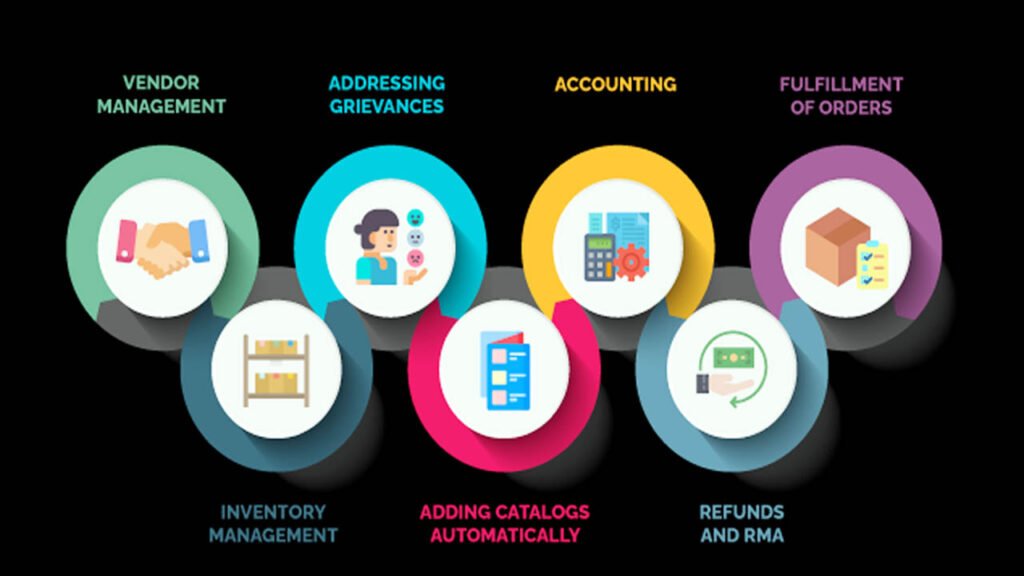
Last month, a store owner told me something that stuck. He said, “I started the business to sell products. Now I spend half my day doing data entry.”
That is not a unique story. Talk to most ecommerce founders, and they will tell you the same thing. Orders pile up, customer emails go unanswered, inventory numbers go out of sync, and the team gets buried in tasks that repeat the same way, every single day.
The fix is not hiring more people. That just adds payroll. The real fix is to set up proper automation for your ecommerce website — the kind that handles repetitive work in the background, and lets your team focus on things that actually move the needle.
At Digital Oasis marketing agency, we have helped several online stores make that shift. This guide walks you through exactly how e-commerce process automation works, where to start, and which ecommerce automation software actually delivers results.
What Is Ecommerce Automation?
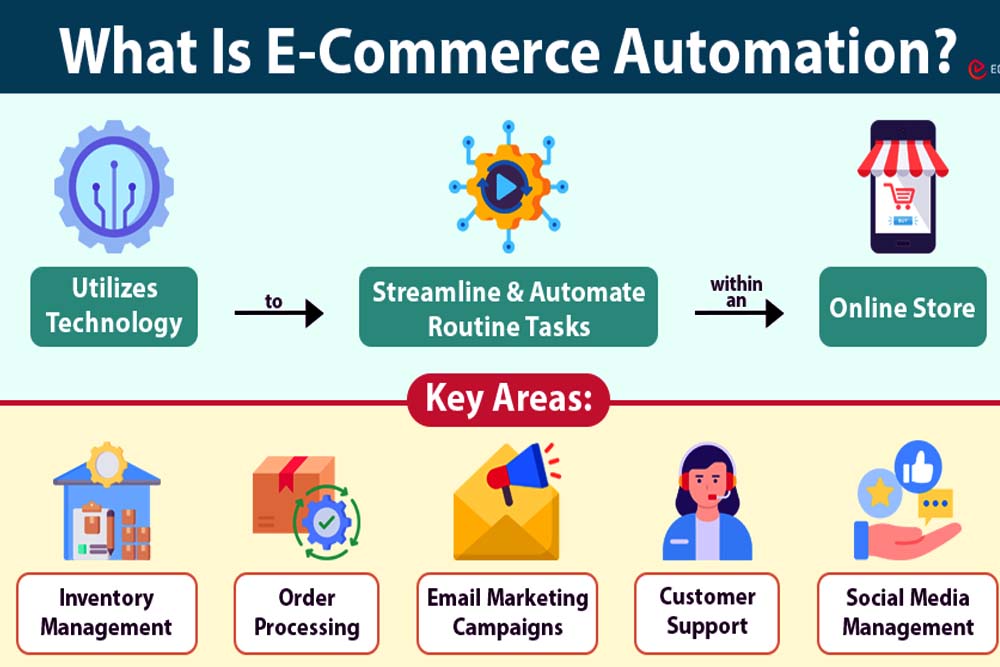
Ecommerce automation means using software to handle store tasks that follow a predictable pattern — without a human stepping in each time. Think of order confirmations, low-stock alerts, cart abandonment emails, and CRM updates. All of these can run on their own, once you set them up correctly.
The logic behind every automation is straightforward. A trigger starts the process — for example, a customer places an order. A condition decides what happens next — for example, the order total is above $500. An action then fires automatically — the system tags it as high-value and notifies your operations team on Slack.
One workflow like that can save 20 minutes per order. Across 200 orders a month, that is 66 hours saved — without spending a single extra dirham on staff.
According to McKinsey, 66% of business leaders had already piloted workflow automation for at least one process by 2020. By 2024, that number crossed 40% of businesses globally running some form of active ecommerce automation software. The stores moving fast on this are the ones pulling ahead.
Why Does It Matter for Your Online Store?
Customers today are not patient. Research from HubSpot found that 90% of shoppers expect a response to their support question in under 10 minutes. A human team cannot cover that consistently — especially across time zones, weekends, or peak sale periods.
Automation can. And beyond customer support, it directly cuts costs. Stores that implement automation tools report operational cost reductions of up to 30%. Sales productivity rises by 14.5% when teams stop handling repetitive manual work.
How Does Automation for Your Ecommerce Website Actually Work?
A lot of people think e-commerce process automation is complicated. It is not. It is basically a set of rules your store follows automatically — no coding needed, no technical team required.
Here is a real example. H&M ran a chatbot on Kik. When a customer browsed without buying (trigger), and had not purchased in 30 days (condition), the system sent a personalized message with a 10% discount (action). That one automated flow achieved an 86% engagement rate.
Most store owners are not H&M, but the same logic applies at any scale. Here is a simple ecommerce automation checklist of tasks you can realistically hand over to software right now:
Inventory level updates the moment stock drops below a set number. Order confirmation emails are sent the second a purchase goes through. Back in stock notifications are sent automatically to customers who asked for them. Follow-up messages to shoppers who leave items in their cart. Customer records sync automatically to your CRM. Shipping updates are sent to buyers without anyone pressing a button.
How many of those does your team still do by hand?
Ecommerce Order Automation — Fix the Biggest Time Drain First
Orders are the heart of any ecommerce business. They are also the biggest source of manual, repetitive work. That makes order automation the best place to start when you decide to automate your online store tasks.
A proper order automation setup handles tagging, fraud detection, fulfilment routing, and holds on suspicious transactions — all without your team reviewing each one manually.
Consider Helthjem, a Norwegian delivery company that added food ordering during the COVID-19 pandemic. Customers wanted delivery updates around the clock. The support team could not keep up. Helthjem deployed an AI chatbot for ecommerce customer support to handle those common questions automatically. The support team shifted focus to making fulfilment smoother. The result — a 25% boost in average order value, directly because service became faster and more reliable.
To set this up for your store, follow these three steps. Identify the trigger — a new order is placed. Define the condition — is it a standard order or does it have a flag? Set the action — route it to the right fulfilment partner, tag it in your system, or send a notification to your team.
Tools like Shopify Flow, ShipStation, and Fishbowl Commerce Suite handle all of this well.
Ecommerce Marketing Automation — Turn Abandoned Carts into Revenue
Cart abandonment is money that almost happened. A shopper found your product, added it to the cart, and then left. Without a follow-up, that sale is gone. With the right automation software, it becomes a second chance.
Dressmann, one of Scandinavia’s biggest fashion retailers, tackled this head-on. The brand introduced conversational AI with custom cart abandonment email automation. The outcome — a 34% increase in website engagement and a 17% jump in average order values. No extra staff. No manual outreach. Just smart automation running in the background.
The economics of email automation are hard to argue with. Research consistently shows that every $1 spent on email automation returns between $36 and $40. And 59% of marketers report a direct improvement in ROI after adding personalization to their automated campaigns.
Here is what a solid marketing automation sequence looks like when you automate your ecommerce website properly.
A customer views a product category and leaves without buying. The system tags them. Within two hours, they receive an email showing the items they viewed plus similar ones. Three days later, if there is still no purchase, a second email goes out with a small discount or a low-stock warning.
That entire flow runs on tools like Klaviyo, Omnisend, or ActiveCampaign. It requires a one-time setup, and then it works indefinitely.
It is also worth adding back in stock notifications to your setup. When a product comes back into inventory, the system automatically emails every customer who asked to be notified. That single workflow recovers sales you would otherwise lose permanently.
Ecommerce Customer Support Automation — Serve More, Hire Less
Customer service is where most growing stores hit a wall. Orders double, but the support team cannot scale at the same pace.
Ecommerce customer support automation solves this without adding headcount. An AI chatbot handles the questions that repeat constantly — order status, return policies, delivery times, and product availability. Your human agents then focus only on complex or high-value conversations that actually need a person.
Thon Hotels ran into exactly this problem as they expanded. Their support team was overwhelmed by repetitive enquiries about room availability and booking policies. They deployed an AI chatbot to handle the common questions automatically. The result was fewer repetitive tickets, faster responses for guests, and a noticeably better experience for the support team, who now handled only the conversations that mattered.
The same principle applies to any ecommerce store. Set up your chatbot to answer FAQs, trigger order lookup responses, and route complex questions to the right team member. It is one of the highest-ROI automation moves you can make.
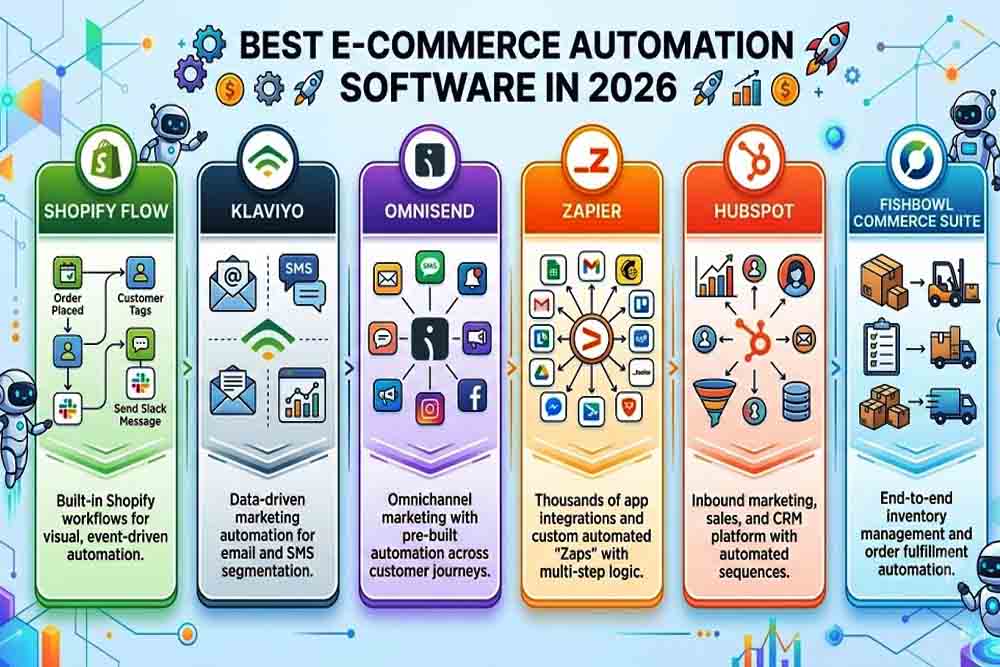
Best Ecommerce Automation Software in 2026
The tool you pick should match your store platform and your team’s level of technical experience. Here is a straightforward breakdown.
Shopify Flow:
It is the natural starting point for Shopify stores. It handles order tagging, fraud flags, and basic workflows at no extra cost.
Klaviyo:
Klaviyo is the strongest option for email and SMS marketing automation. It connects natively with Shopify, WooCommerce, and BigCommerce, and its segmentation features are excellent.
Omnisend:
Omnisend covers email, SMS, and push notifications in a single platform. It is the right pick for stores that want multi-channel outreach without juggling separate tools.
Zapier:
Zapier is what you reach for when two tools do not connect natively. It links your store with your CRM, accounting software, or project management tools without any coding.
HubSpot:
HubSpot is worth considering if you want CRM, email automation, and customer support all in one place. It is especially useful for stores that also handle B2B clients or repeat wholesale buyers.
Fishbowl Commerce Suite:
Fishbowl Commerce Suite is built for inventory and order management at volume. If your store handles complex supply chains or stock across multiple warehouses, this is the right fit.
Start with one tool. Build one workflow. Test it thoroughly before expanding. Adding too many systems at once leads to data conflicts and broken automations that no one notices until a customer complains.
How to Automate Your Ecommerce Store — Step by Step
The process is simpler than most people expect. Here is your practical ecommerce automation checklist to get started without feeling overwhelmed.
Map your workflows first
Write down every task your team does daily, weekly, and monthly. Mark the ones that follow the same pattern every time. Those are your automation candidates.
Match tools to your existing setup
Do not pick ecommerce automation software that requires replacing your whole tech stack. Look for options that connect cleanly with your store platform, CRM, and payment processor.
Test before going live
Run a real test order through your new workflow. Ask — what happens if the payment fails? What happens if a product goes out of stock mid-campaign? Fix those edge cases before the workflow touches real customers.
Scale gradually with conditional logic
Once a workflow is stable, add layers. Route orders by region to separate tracking sheets. Send VIP buyers to a premium CRM segment automatically. Set low-stock triggers that fire before you actually run out. Each layer compounds the efficiency.
One thing that always trips people up — data hygiene. Outdated customer records, duplicate entries, or mismatched fields across platforms will silently break your automations. Clean your data before building on top of it.
Mistakes That Kill Ecommerce Automation Before It Works
Over-automating without user control is the most common failure. Microsoft’s Clippy is the classic example — an automated helper that fired constantly and without context until users grew to hate it. Generic bulk emails sent to your entire list are the ecommerce version of that mistake.
Personalization is not optional here. A McKinsey report found that 71% of consumers expect personalized experiences from the brands they buy from. And 76% get actively frustrated when that does not happen. Automation should never mean generic. It should mean precise — the right message, the right person, the right moment.
Poor data management is the other silent killer. Outdated customer records, duplicate entries, or fragmented data between platforms will produce wrong outputs, missed orders, and frustrated customers — even when the automation itself is set up correctly.

People also ask
What is e-commerce process automation?
It is the use of software to handle repetitive store tasks — like order processing, inventory updates, and customer emails — automatically, based on pre-set rules called triggers, conditions, and actions.
What is the best ecommerce automation software?
It depends on your platform and goals. Shopify Flow is the easiest entry point for Shopify stores. Klaviyo leads for email and SMS. Zapier bridges tools that do not connect natively.
Can you fully automate your ecommerce website?
Most operational tasks — order processing, inventory updates, email sequences, CRM syncing — can run fully automated. Customer relationships and strategic decisions still benefit from human judgment.
What should be on an ecommerce automation checklist?
Start with order confirmations, cart abandonment emails, back in stock notifications, inventory sync, shipping updates, and CRM record updates. These give the highest return for the least setup effort.
How much does ecommerce automation software cost?
Shopify Flow is free with your Shopify plan. Klaviyo and Omnisend both have free tiers. More complete setups range from a few dollars a month to several hundred for enterprise platforms.
Final Thoughts
The stores that grow sustainably are not the ones with the largest headcount. They are the ones with systems that run efficiently even when the team is not watching.
Automation for your ecommerce website is not a one-day project. It starts with one workflow, one tool, and one test. Then it compounds. Every automated task your store handles on its own is time and money redirected toward growth.
At Digital Oasis, we work with ecommerce brands to build practical automation setups built around how your store actually operates — not a generic template that looks good on paper but does not fit your real workflows. If your team is still handling tasks that software can do, it is worth a conversation.
Reach out to Digital Oasis today. Let us look at your workflows together and find the fastest wins for your store.